Ανακάλυψα ένα Link που θα φανεί πολύ χρήσιμο σε όποιον
παρακολουθεί stream και θέλει να βλέπει δυο παράλληλα,διαβάζοντας το chat χωρίς
να χρειάζεται να αλλάζει καρτέλες κάθε τρεις και λίγο.
Ετικέτες
- Funny
- GigaTeam
- Greek Stream
- Heart of the Swarm
- News - Tips
- event
- greek
- international
GigaTeam stream
Εμφάνιση αναρτήσεων με ετικέτα News - Tips. Εμφάνιση όλων των αναρτήσεων
1 Απρ 2013
11 Μαρ 2013
HOTS COMMUNITY LAUNCH PARTY
ΕΛΑ ΝΑ ΕΤΟΙΜΑΖΟΜΑΣΤΕ ΣΙΓΑ ΣΙΓΑ !!!!
Watch live video from Starcraft on www.twitch.tv
Main Stream: Twitch.tv/Starcraft
Korean Language Stream: Twitch.tv/Starcraft_kr
Australian Stream (English): Twitch.tv/Starcraft_anz
French Stream: Twitch.tv/Starcraft_fr
Russian Stream: Twitch.tv/Starcraft_ru
German Stream: Twitch.tv/Starcraft_de
Events
Seoul, South Korea
Players:
Casters and Hosts:
Versailles, France
Players:
Casters and Hosts:
Irvine, California, USA
Players:
Casters and Hosts:
Taipei, Taiwan
Players:
Casters and Hosts:
Melbourne, Australia
Players:
Casters and Hosts:
7 Φεβ 2013
PROJECT BLACKSTONE
Οπως πολλοί γνωρίζετε, είμαι ένας ταλαντούχος Pro Gamer αλλά και ένας καταπληκτικός τεχνικός υπολογιστικών συστημάτων.
Αυτό που όμως φαντάζεστε αλλά δεν το γνωρίζετε, είναι ότι είμαι και πολύ καλός Hacker, ύπουλος και υποχθόνιος!!!
Μετά από ένα Underground σερφάρισμα ανακάλυψα ένα βρωμερό project που ονομάζεται BLACKSTONE και το έχουν καταστρώσει οι βρωμεροί Terran, για να δημιουργήσουν πιθανώς ένα υβρίδιο ή κάποιο είδος αυτοθεραπείας.
Σας παραθέτω τον σύνδεσμο αλλά δεν θα σας αποκαλύψω τον κωδικό πρόσβασης διότι είναι πιθανών να κινδυνεύσει η σωματική σας ακεραιότητα αν αποκτήσετε πρόσβαση στα απόρρητα έγγραφα.
ΑΚΟΛΟΥΘΟΥΝ ΑΠΟΡΡΗΤΕΣ ΦΩΤΟΓΡΑΦΙΕΣ ΑΠΟ ΤΟ ΠΕΡΙΕΧΟΜΕΝΟ ΤΗΣ ΣΕΛΙΔΑΣ
christipan
12 Ιαν 2013
Open Broadcaster Software Guide by wertokleo
Dustuxws gia logous eukolias to post tha ginei se greeklish. Auto einai ena guide gia na exete to kalutero apotelesma poiotitas analoga me to bandwidth k ton upologisti apo ton opoio streamarete. To guide k ta setting xwrizontai se 2 eidwn cumpoter.....desktop k laptop. Kuriws giati to resolution pou trexei einai diaforetiko. Ta settings einai optimized gia sc2 k gia upologistes xwris tromera xaraktiristika alla toulaxiston modernous (px. i5 1st generation, GPU k mnimi axioprepi). Apo ta protimwmena settings to kalutero einai na dokimasete ta lowest k AN pigainei kala (kuriws stis stigmes me entoni kinisi) tote na dokimasete to kati parapanw.
GENIKA SETTINGS
-To GAME CAPTURE sta video settings einai protimotero apo to WINDOW CAPTURE. An den trexei to game se GAME CAPTURE tote mono protimame to deutero k auto me AERO ENABLED!
-FPS: Deite to protimomeno. Mporeite na to valete k 20 xwris na exete apwlies simantikes. Panw apo 30 einai eite epeidi eisai malakas eite epeidi exeis super upologisti k bandwidth.
-Otan leme gia resolution tha milame gia ta ORIZONTIA pixels k oxi ta katheta. Diladi to deutero noumero tou resolution. To base resolution DEN YPARXEI LOGOS na to peiraxoume k tha asxolithoume me to RESOLUTION DOWNSCALE tou programmatos.
-To sound bitrate den exete idiaitero logo na min to katevasete sta 64.
-To CPU preset VERYFAST einai polu kalo option. Oi perissoteroi users lene oti na to allaxeis se mikroteri taxitita (k thewritika kaluteri eikona) den kerdizeis sxedon tipota alla xaneis dramatika tin CPU sou.
----------------------------
LAPTOP 1Mbps upload
FPS ---> 30
Quality ---> 7 alla mporeite na dokimasete k to 8. An kata ti diarkeia entonis kinisis kollaei prepei na to rixete sto 6.
Max Bitrate ---> 680
Buffer Size ---> 408
Resolution ---> 480 k katw
----------------------------
LAPTOP 2Mbps upload
FPS ---> 30
Quality ---> 7 alla mporeite na dokimasete k to 8. An kata ti diarkeia entonis kinisis kollaei prepei na to rixete sto 6.
Max Bitrate ---> 1530
Buffer Size ---> 1530
Resolution ---> 720 k katw
GENIKA SETTINGS
-To GAME CAPTURE sta video settings einai protimotero apo to WINDOW CAPTURE. An den trexei to game se GAME CAPTURE tote mono protimame to deutero k auto me AERO ENABLED!
-FPS: Deite to protimomeno. Mporeite na to valete k 20 xwris na exete apwlies simantikes. Panw apo 30 einai eite epeidi eisai malakas eite epeidi exeis super upologisti k bandwidth.
-Otan leme gia resolution tha milame gia ta ORIZONTIA pixels k oxi ta katheta. Diladi to deutero noumero tou resolution. To base resolution DEN YPARXEI LOGOS na to peiraxoume k tha asxolithoume me to RESOLUTION DOWNSCALE tou programmatos.
-To sound bitrate den exete idiaitero logo na min to katevasete sta 64.
-To CPU preset VERYFAST einai polu kalo option. Oi perissoteroi users lene oti na to allaxeis se mikroteri taxitita (k thewritika kaluteri eikona) den kerdizeis sxedon tipota alla xaneis dramatika tin CPU sou.
----------------------------
LAPTOP 1Mbps upload
FPS ---> 30
Quality ---> 7 alla mporeite na dokimasete k to 8. An kata ti diarkeia entonis kinisis kollaei prepei na to rixete sto 6.
Max Bitrate ---> 680
Buffer Size ---> 408
Resolution ---> 480 k katw
----------------------------
LAPTOP 2Mbps upload
FPS ---> 30
Quality ---> 7 alla mporeite na dokimasete k to 8. An kata ti diarkeia entonis kinisis kollaei prepei na to rixete sto 6.
Max Bitrate ---> 1530
Buffer Size ---> 1530
Resolution ---> 720 k katw
----------------------------
LAPTOP 5Mbps upload kai panw
FPS ---> 30
Quality ---> 8 alla mporeite na dokimasete mexri k 10.
Max Bitrate ---> 3000 (min vazete megalutero apo 3000 giati osoi viewers den exoun kalo download mporei na exoun provlima k na laggarei)
Buffer Size ---> 3000
Resolution ---> 720. To 1080 den exei noima giati to base resolution einai xamilotero k den kerdizete tipota.
----------------------------
DESKTOP 1Mbps upload
FPS ---> 30
Quality ---> 7 alla mporeite na dokimasete k to 8. An kata ti diarkeia entonis kinisis kollaei prepei na to rixete sto 6.
Max Bitrate ---> 680
Buffer Size ---> 408
Resolution ---> 480 k katw
----------------------------
DESKTOP 2Mbps upload
FPS ---> 30
Quality ---> 7 alla mporeite na dokimasete k to 8. An kata ti diarkeia entonis kinisis kollaei prepei na to rixete sto 6.
Max Bitrate ---> 1530
Buffer Size ---> 1530
Resolution ---> 720 k katw
LAPTOP 5Mbps upload kai panw
FPS ---> 30
Quality ---> 8 alla mporeite na dokimasete mexri k 10.
Max Bitrate ---> 3000 (min vazete megalutero apo 3000 giati osoi viewers den exoun kalo download mporei na exoun provlima k na laggarei)
Buffer Size ---> 3000
Resolution ---> 720. To 1080 den exei noima giati to base resolution einai xamilotero k den kerdizete tipota.
----------------------------
DESKTOP 1Mbps upload
FPS ---> 30
Quality ---> 7 alla mporeite na dokimasete k to 8. An kata ti diarkeia entonis kinisis kollaei prepei na to rixete sto 6.
Max Bitrate ---> 680
Buffer Size ---> 408
Resolution ---> 480 k katw
----------------------------
DESKTOP 2Mbps upload
FPS ---> 30
Quality ---> 7 alla mporeite na dokimasete k to 8. An kata ti diarkeia entonis kinisis kollaei prepei na to rixete sto 6.
Max Bitrate ---> 1530
Buffer Size ---> 1530
Resolution ---> 720 k katw
----------------------------
DESKTOP 5Mbps upload kai panw
FPS ---> 30
Quality ---> 8 alla mporeite na dokimasete mexri k 10.
Max Bitrate ---> 4000 (3000 an pate gia 720 analisi)
Buffer Size ---> 4000 (3000 an pate gia 720 analisi)
Resolution ---> 720 mexri k 1080
Me analiseis 1980x1080 pou exoun ta desktop sinithws to 1080 analisi einai KORYFAIO. ME trela upload bandwith, panw apo 5 Mpbs, mporeite na peiraxete to FPS mexri 60 alla to pio simantiko prin kanete autes tis alages na exete ena feedback apo tous viewers. 4Mpbs streaming einai arketo bandwidth akoma k gia download gia merikous xristes k an thelete korufaio stream tha prepei na to anevasete akoma perissotero. Alla korufaio stream pou na kollaei gia ton viewer k na to vlepeis mono esu ti na to kaneis?
----------------------------
TIPS:
-An thelete na min akougetai i fwni sas otan streamarete apla apenergopoiite to MIC sto geniko interface tou programmatos. Alla an gia paradeigma milate ston skype oi sunomilites sas tha akougontai kanonika. Den uparxei support apo to programma gia na mi ginetai auto k mono me ta input settings apo ton upologisti sas mporeite na to allaxete k o ixos tou skype na pigainei allou. De lew onomata alla o kammenos o regulator auto kanei :)
-O ixos tou paixnidiou akougetai MONO an to window einai "on top".
-An lagarei to stream mallon ftaiei to bandwidth. Dokimaste na to xamilwsete px 510 k 306 gia max bitrate k buffer size antistoixa. An exete provlima sto stream se entoni kinisi katevaste to quality.
-Yparxei automatos scene switcher san plugin gia to OBS. Stin ousia allazei to scene otan gia paradeigma kaneis ALT-tab xwris na xreiazetai na to epilexeis esu. Eidika gi autous pou exoun desktop capture einai sxedon aparaitito. Onomazetai R1CH's OBS scene switcher plugin.
Autaaaaaaaaaaaaaaaaaaaaaaaaaaaaaa
DESKTOP 5Mbps upload kai panw
FPS ---> 30
Quality ---> 8 alla mporeite na dokimasete mexri k 10.
Max Bitrate ---> 4000 (3000 an pate gia 720 analisi)
Buffer Size ---> 4000 (3000 an pate gia 720 analisi)
Resolution ---> 720 mexri k 1080
Me analiseis 1980x1080 pou exoun ta desktop sinithws to 1080 analisi einai KORYFAIO. ME trela upload bandwith, panw apo 5 Mpbs, mporeite na peiraxete to FPS mexri 60 alla to pio simantiko prin kanete autes tis alages na exete ena feedback apo tous viewers. 4Mpbs streaming einai arketo bandwidth akoma k gia download gia merikous xristes k an thelete korufaio stream tha prepei na to anevasete akoma perissotero. Alla korufaio stream pou na kollaei gia ton viewer k na to vlepeis mono esu ti na to kaneis?
----------------------------
TIPS:
-An thelete na min akougetai i fwni sas otan streamarete apla apenergopoiite to MIC sto geniko interface tou programmatos. Alla an gia paradeigma milate ston skype oi sunomilites sas tha akougontai kanonika. Den uparxei support apo to programma gia na mi ginetai auto k mono me ta input settings apo ton upologisti sas mporeite na to allaxete k o ixos tou skype na pigainei allou. De lew onomata alla o kammenos o regulator auto kanei :)
-O ixos tou paixnidiou akougetai MONO an to window einai "on top".
-An lagarei to stream mallon ftaiei to bandwidth. Dokimaste na to xamilwsete px 510 k 306 gia max bitrate k buffer size antistoixa. An exete provlima sto stream se entoni kinisi katevaste to quality.
-Yparxei automatos scene switcher san plugin gia to OBS. Stin ousia allazei to scene otan gia paradeigma kaneis ALT-tab xwris na xreiazetai na to epilexeis esu. Eidika gi autous pou exoun desktop capture einai sxedon aparaitito. Onomazetai R1CH's OBS scene switcher plugin.
Autaaaaaaaaaaaaaaaaaaaaaaaaaaaaaa
13 Νοε 2012
Heart of the Swarm Arrives March 12, 2013
Ναι είναι γεγονός, μετά από τόση αναμονή η BLIZZARD ανακοίνωσε την κυκλοφορία του
HEART OF THE SWARM στις 12 Μαρτίου 2013
περισσότερες πληροφορίες : http://eu.battle.net/sc2/en/blog/6512880/
22 Οκτ 2012
Heart of the Swarm Update Menu (Sreenshot)
Heart of the Swarm Update
Η BLIZZARD ανακοίνωσε ριζικές αλλαγές στο Menu του Heart of the Swarm beta, οι οποίες θα εφαρμοστούν και στην τελική έκδοση του παιχνιδιού!!!!
Ακολουθούν φωτογραφίες και περιγραφή του νέου Menu.
ORIGINAL LINK : http://eu.battle.net/sc2/en/blog/6298733/
While its impact to players may seem subtle, the out-of-game experience in StarCraft II can be just as important as the in-game experience. Our Battle.net statistics show that players spend about a third of their time inStarCraft II using the menus outside of a game. They might be browsing the latest Arcade games, checking out someone’s profile, reviewing the score screen of past games in their match history, or just chatting with some friends. It’s important to us to make this experience as streamlined and usable as possible.
The 1.5 patch we released a couple months ago was a major update that included several changes to the menus and the addition of the new Arcade experience. What you might not know is that many of the changes in 1.5 were actually slated to be a part of the Heart of the Swarm expansion. We felt that several features, including Arcade, would be of immediate benefit to players, and decided to release them earlier in the 1.5 patch. Since we weren’t done with the rest of Heart of the Swarm yet, we had to compromise in some areas of the menus to support these features. We weren’t really happy with how this added additional complexity to the menus.
Since then, we’ve continued to work on Heart of the Swarm, and we’ve made some big changes to improve the overall user experience. With the release of the next major Heart of the Swarm beta patch, we'd like to give you an advance look at those changes. These updates will become available to both Wings of Liberty and Heart of the Swarm players once the expansion is live.
We had several design goals in mind with the changes you’ll see in the Heart of the Swarm beta: simplify navigation, increase consistency, and improve usability. We also added some more functionality along the way. Here are just some of the changes we’ve made:
MENUS
We simplified basic menu navigation. Now you should be one click away from any major screen in the UI. For example, the Custom Game function is right on the main menu, so you no longer have to first select Multiplayer to get to it. We also tried to eliminate redundant screens and game modes.
We streamlined the look of the UI. This gives us more space to work with and makes it easier for us to make improvements in the future.
STATS
We’ve heard your desire for more stats, and we couldn’t agree more. With Heart of the Swarm we are adding more stats to help you track your play.
To start, we have included a racial stats tab so you can view your play stats against each race in ranked games.
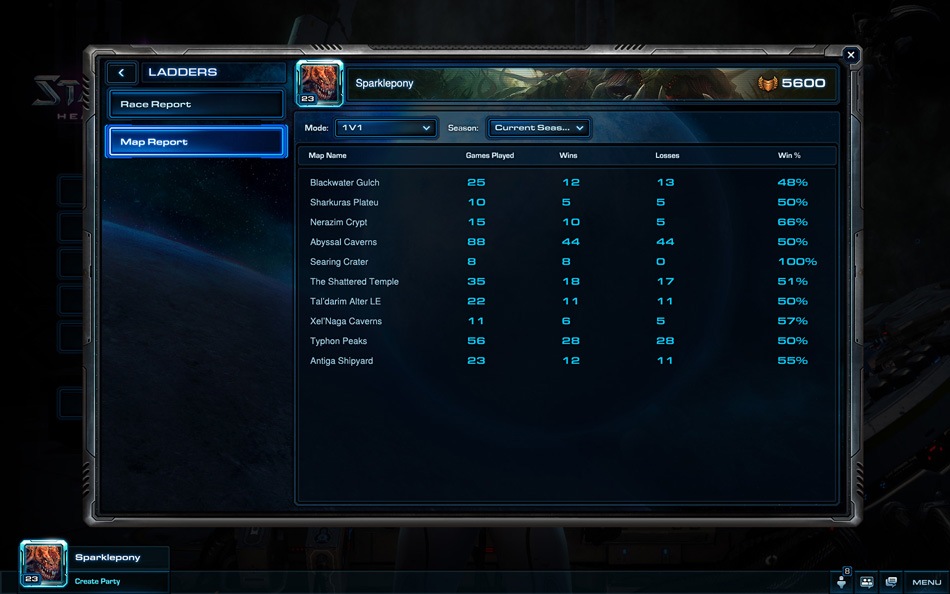
There’s also now a map stats tab, so you can see how you perform on your most played maps. The new performance tab on the score screen will display your performance against opponents and Battle.net will track your career averages as you play games throughout the season.
And finally, now that we have added unranked play as an option, we’ve returned full stats (including losses) for all leagues back into the profile summary and ladder pages. Players who play competitively on the ladder can now better track their progress regardless of which league they’re in. And those players that would like to enjoy the benefits of matchmaking, but are not interested in the pressure of being ranked can now use the unranked play mode.
PARTIES
Party functionality has been gathered up into a single party window, and we’ve increased the maximum party size. We hope that this will be helpful with arranging games with your friends. It will be also be particularly useful with Arcade games that allow for larger team sizes.
CUSTOM GAMES
In 1.5.0, the Arcade dramatically changed the way players find games to play. Now we’re bringing a lot of the same tools that help make finding Arcade games easy to the StarCraft melee map Custom Game section.
For example, you can now find Open Games, Bookmarks, and Recently Played on the left side of the interface, the same way you would in Arcade. You can also sort the maps by Top Played, Top Rated, Up & Coming, and Newest.
Maps in the Custom Game screen will also now have a Game Info dialog like their Arcade counterparts. Mapmakers can add screenshots, include patch notes, and outline details on map strategy, while players will be able to rate and review the maps they play.
Please note: The Game Info dialog for Custom Game maps did not make it in time for the very next major beta patch, but you should see it in a major beta patch in the weeks to come.
Now that we've highlighted some of the changes we’re making, we want to hear what you think. We appreciate how passionate the StarCraft II community is, and always look forward to your feedback. Remember, these are only some of the changes we have coming in Heart of the Swarm. There’s even more to come, so stay tuned for further updates!
Alan Dabiri is a Lead Software Engineer for StarCraft II. He has been measured at over 200 APM in the UI menus
.
.
ORIGINAL LINK : http://eu.battle.net/sc2/en/blog/6298733/
Εγγραφή σε:
Αναρτήσεις (Atom)